
Online learning community
What is it?
The ideas that underpin the design and characteristics of learning communities can be traced back to ‘socio-cultural theory’ and ‘social constructivism’. The seminal work of Scardamalia and Bereiter (1994) applied these concepts to the development of online learning environments or ‘knowledge-building communities’.
One of the most prominent models associated with approaches that are based on the idea of ‘learning as a social process’ is the ‘Community of Inquiry’ model.
Community of Inquiry
This model was developed by Garrison et. al (1999) and it has become very influential as a framework for the development of online learning environments (Garrison et al., 2010). The model consists of three interrelated dimensions or ‘presences’: social presence, cognitive presence and teaching presence. The idea is that online learning environments require the existence of these presences to help facilitate learning that promotes critical inquiry.
The Community of Inquiry Model
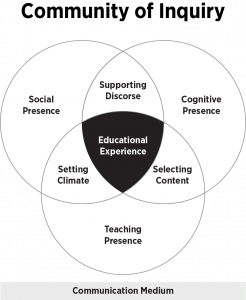
From (Garrison et al., 1999)
Social presence refers to design elements that promote group cohesion and open and safe environments for conducting discourse. Cognitive presence refers to elements within learning designs that promote cognitive engagement and teaching presence refers to learning design and teaching practice in the delivery of programs of study.
Students are more likely to participate in online discussions if they feel they are in a safe, inclusive environment. Introducing yourself and giving students opportunities to connect with each other can help them build confidence in participating in online discussions. Icebreaker activities are a useful way to initiate discussions and begin the process of building a community among students. Participating in these also establishes your presence and will help students feel more connected. You can share information about yourself that students might not learn during typical instruction.
Application of the model
This table illustrates some concrete activities to promote ‘social presence’ in your learning environment.
| Stage | Asynchronous | Synchronous |
|
Access and motivation
|
“Personal introductions” are simple way for you and your students to get to know each other. You could structure the activity by asking students specific questions that combine both personal and professional information. | “The interview” – In this ice-breaker activity, pair students or put students in small groups (for larger classes), get students to interview each other. Prepare a few questions for students to ask each other. Ask students to report their findings back to the main session, in effect introducing each other rather than themselves. |
| “Five Pictures” – In this ice-breaker activity, learners create a collage of five pictures or images that best describe themselves. Learners should also describe how the pictures represent who they are. You can ask students to respond to other students posts. This not only introduces the social mechanics, but also, the technical aspects of the discussion forum. |
“Who done that”
– This activity aims to establish commonalities, introducing the students to each other and the technology, particularly the annotation tool (Zoom and Collaborate). You can share a slide with a list of items a list of items relating to personal and professional life. Using the annotation tool, ask students to type their names next to three items that they have done in the list. If they are unable to find anything on the list they have done, they can add to an alternative list.
This could also work using Wikis in vUWS or other shared documents (e.g. Google Docs) |
|
|
Online socialisation
|
“Two Truths One Lie” - This ice-breaker activity is a variation to the personal introductions where students are asked to post two truths about themselves and one statement that is a lie. Fellow peers must attempt to determine which piece of given information is false. Students are encouraged to ask questions by responding to the posts from their peers. | “Group challenge” - During the first asynchronous session, establish regular groups (especially for large classes) and introduce students to their groups using breakout rooms. Present the groups with a problem/challenge. Students can begin the process of interacting and connecting with their group members as they work together to solve the challenge. |
| “Online Café” – Create a Discussion forum as a social space for students to have informal conversations. | “Complete this sentence” (Ice breaker activity) – This is another ice-breaker activity that is useful in stimulating interaction between students, allow students to familiarise themselves with the social function of the chat tool within in a synchronous session (Zoom and Blackboard). In this activity, share an unfinished sentence and have the students complete it, using the chat. |
This is an excellent resource with many examples of how you can promote social, cognitive and teaching presence in your units.
https://cte.virginia.edu/resources/applying-community-inquiry-framework
References
Garrison, D. R., Anderson, T., & Archer, W. (1999). Critical inquiry in a text-based environment: Computer conferencing in higher education. The Internet and Higher Education, 2(2) , 87-105
Garrison, D.R., Anderson, T., Archer, W. (2010). The first decade of the community of inquiry framework: A retrospective. The Internet and Higher Education. 13(1) , 5-9
(1994) Computer Support for Knowledge-Building Communities, Journal of the Learning Sciences, 3:3, 265-283
