
What is Adobe Creative Cloud?
A collection of 20+ applications for everything from photo to video to design and beyond. To understand what each application does, and ways it can be incorporated in teaching/learning to foster digital literacy across higher education, please view this matrix: Education Digital Literacy Matrix for Creative Cloud
Sign in to the Adobe Creative Cloud here with your Western email.
If you don’t have access, please submit a License Request via the IT portal here .
*Please note: Adobe Spark is now known as Adobe Express
How do I incorporate Adobe tools into my work or teaching/learning?
-
Authentic Assessment
-
Harnessing Generative AI
-
Streamline and uplift ways of working
-
1. Authentic Assessment
Students are more engaged when they have voice and choice in their learning.
80% of all students believe creativity and visual communication will equip them to succeed in the classroom and workplace, and they desire more self-expression. (Source: Improving Student Outcomes study, Adobe, Oct 2021).
Adobe tools can enable multiple modalities of assessment to authentically assess students’ learning. Students desire a more creative and authentic form of assessment which prepares them for their future career. By encouraging students to create a video, a podcast, an infographic, or a webpage, students can demonstrate their knowledge in a creative way.
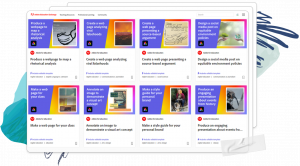
Visual communication across modalities is relevant to all fields of study. Adobe Express makes it possible for every student (and staff) to share their ideas, visually communicate and demonstrate understanding and mastery of academic content across any digital medium. This all-in-one solution allows for mixed media story telling.
In a joint report by Adobe and Times Higher Education it’s detailed how digital creative technologies can further empower both learners and teaching staff to innovate authentic assessment practices producing positive results. Read the report here .
Find ideas for how to write digital storytelling into your assessment in the Adobe Education Exchange . Here you’ll find examples from Creative Campuses globally for every discipline. Linked within are subject outlines with learning outcomes, editable student templates, example grading rubrics, and more.
2. Harnessing Generative AI
Firefly is Adobe’s Generative AI tool, which unlocks endless creative possibilities for your students: from ideation to prototyping to pitching their work. Any student can leverage the power of Firefly to alleviate “blank page” anxiety and streamline the creative process. Designed to be ethical, Firefly is trained on Adobe Stock’s 300 million+ assets, as well as openly-licensed and public domain content. Founding the Content Authenticity Initiative , Adobe is the only higher education partner that is pioneering a responsible, ethical approach to Generative AI.
Firefly generative AI capabilities are embedded into other Adobe tools for a simple and easy user experience, including Adobe Express, Photoshop, Illustrator, and Stock.
In a rapidly evolving landscape, AI skills are a piece of the career readiness puzzle.
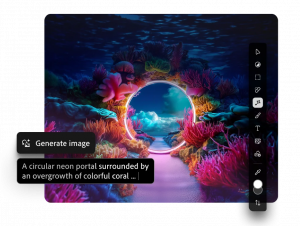
Try Firefly now: firefly.adobe.com
Supercharge engaged, creative students with Adobe Firefly.
-
 Unleash productivity
- Spark ideation
- Expand creative reach
- Concept visualisation
- Connecting with diverse audiences
Note: It’s not to replace critical thinking or individual work.
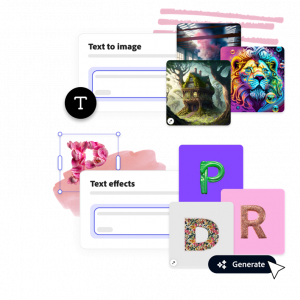
Use Firefly for 4 tasks using the Generative AI:
- Text to image
- Generative expand
- Generative fill
- Text effects
Enrol the full course on Generative AI here .
3. Streamline and Uplift ways of working
Adobe Express is revolutionising how students and staff demonstrate digital fluency. Now people of any skill level can quickly and easily take advantage of powerful features like video editing, background removal, PDF editing, animations and more. Login to Adobe Express here to get started!

Adobe Express is an intuitive, web-based tool that also works directly with Adobe’s industry-leading apps.
Built-in collaboration teaches students how to work in team-based environment, or you can leverage this capabilities alongside colleagues to streamline workflows.
Watch this video tutorial below on how to use Adobe Express or go here to choose a function you’d like to learn and watch shorter tutorials.

Some ways to start using Adobe Express:
- Stylise a PDF
- Build a creative presentation (import an existing Powerpoint or PDF to edit)
- Remove the background of an image
- Generate a QR code
- Design a remixable template
Resources
Education Exchange : the Adobe Education Exchange is a collection of free teaching resources and professional learning for educators. Find lesson plans, learning objectives, templates, rubrics, language for unit outlines, student examples, and more. Also, you’ll find self-paced short courses by topic area with a focus on teaching with Adobe tools.
Find upcoming workshops and events at adobe.westernsydney.edu.au
Point students towards the Creative Skills Series for quick lessons on crucial digital skills for the next gen workforce.
FAQs
- How do I get access to Adobe Creative Cloud as a staff member? Go to the Adobe Creative Cloud sign in page at https://creativecloud.adobe.com/cc and log in using your staffID@westernsydney.edu.au. If you are not able to get access, please request a license here .
- What resources are available for students to learn how to use Adobe tools? The Creative Skills series is a great place to start. These are self-paced short courses designed for students. Also, each application has in-app tutorials which lead the way when beginning.
- How do students get access to Adobe Creative Cloud? Enrolled students are automatically provisioned with a license and simply need to login with their Western email at creativecloud.adobe.com.
